Backup and restore
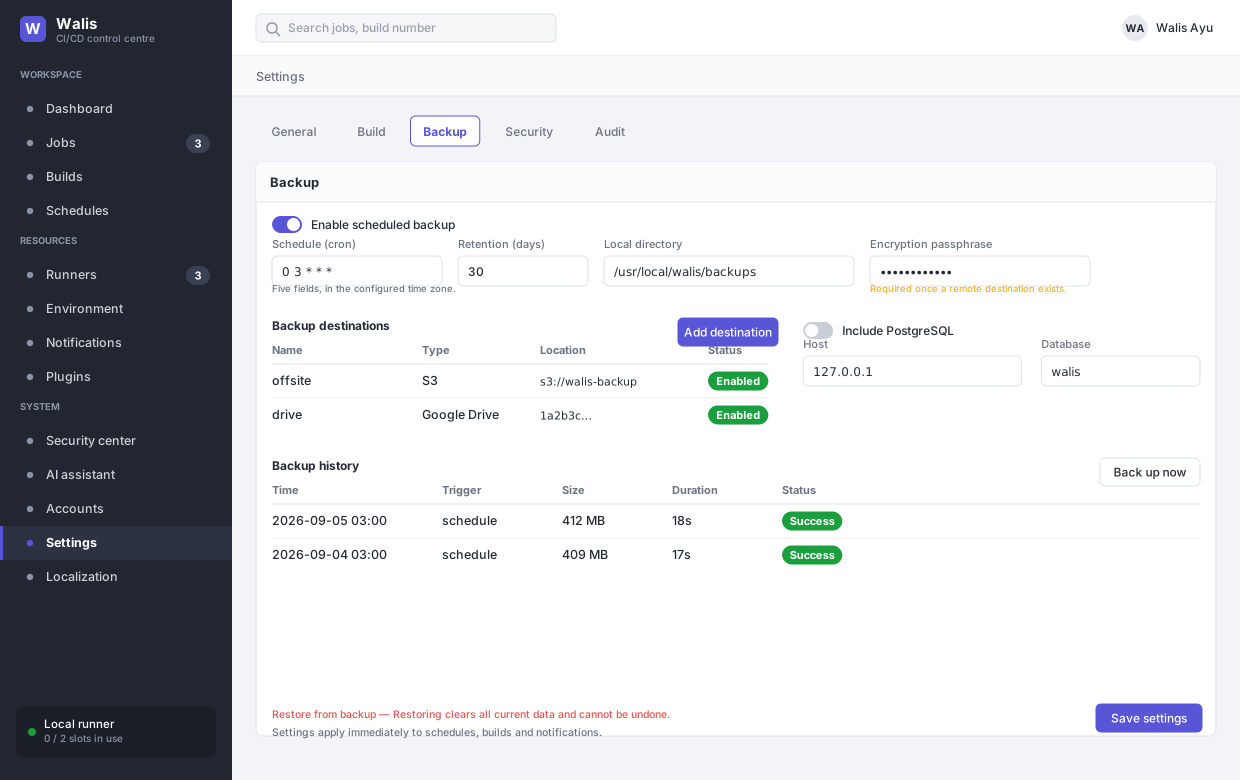
Configured under Settings → Backup. A backup worker runs on its own cron schedule, independent of job schedules.
What goes in
- The Walis database, via
VACUUM INTO— a consistent copy, not a file copy of a live database. - Build artifacts.
- Any extra absolute paths you list, one per line. Directories are packed whole; symlinks are skipped.
- Optionally a PostgreSQL database via
pg_dump.
Encryption
Walis' own versioned format: the key comes from the passphrase through PBKDF2-SHA256, and the archive is written as AES-256-GCM chunks that are each authenticated, with an authenticated end marker. A modified or truncated backup is rejected before any of it is restored. Restore it through Walis — the backup page or POST /api/backup/restore; the restore endpoint accepts only this format. Backups made by older versions in OpenSSL's Salted__ CBC container can still be read for migration, but no new ones are written that way.
A passphrase of 16 to 1,024 characters is mandatory as soon as backups are enabled or any destination exists, and the screen refuses to save without one. The archive contains password hashes and stored credentials; it must not leave the machine in the clear.
Destinations
Add destination opens a wizard: pick a type → create the application (or the access key) → authorise → location and name → test and finish.
| Type | Needs |
|---|---|
| Local or external disk | A directory on this machine. A mounted NAS or external drive counts. |
| S3-compatible (R2, AWS S3, MinIO) | An access key. No application to register. |
| Dropbox | An app registered with Dropbox, authorised once. 150 MB per file. |
| Google Drive | An OAuth client in Google Cloud, authorised once. |
| OneDrive | An app registered in Azure, authorised once. 250 MB per file. |
Everything is implemented in-process — SigV4 is signed by Walis itself. Nothing shells out to aws, rclone or similar, so there is no external binary to install or keep current.
How the three OAuth destinations get a token
Dropbox, Google Drive and OneDrive all work the same way, and the fiddly part is the same for all three: they need a refresh token, which you cannot simply copy out of a settings page.
The wizard does the exchange for you:
- You create an application in the provider's console and paste its client ID and client secret into the wizard.
- Walis builds the authorisation URL with the right parameters and shows it to you. You open it and consent — Walis never fetches that URL itself.
- You paste back the authorisation code. Google and OneDrive redirect to
http://localhost, so the browser shows a connection error; that is expected — copy the whole address bar and the wizard pulls the code out of it. Dropbox shows the code on the page. - Walis exchanges the code for a refresh token server-side and stores it.
So your client secret never goes on a command line, and the authorisation code — single-use and valid for a few minutes — never reaches a log. If you already have a refresh token from somewhere else, there is a paste it directly option.
Editing an existing destination shows the secret as ********. Leaving it alone means "keep it"; you do not have to re-enter credentials to change a folder.
Dropbox
- In the Dropbox App Console, Create app.
- Choose Scoped access, then App folder (backups stay in their own folder) or Full Dropbox, and give it a name.
- Set the permissions before you authorise —
files.content.write,files.content.readandfiles.metadata.readon the Permissions tab. Authorising first and adding permissions afterwards produces a token without them, and you have to start over. - Copy the App key and App secret from the Settings tab.
The authorisation URL carries token_access_type=offline. Without it Dropbox returns a short-lived access token and no refresh token at all, which is the usual reason a hand-built URL does not work.
Google Drive
- In Google Cloud Console, open APIs & Services → Credentials and pick or create a project.
- Enable the Google Drive API.
- Configure the OAuth consent screen — user type External, a name and an email — and add your own Google account under Test users.
- Create credentials → OAuth client ID, application type Desktop app. Copy the client ID and client secret.
Two things worth knowing before you rely on it:
- While the consent screen is in Testing, the refresh token expires after seven days. Backups that work all week and start failing the next are almost always this. Publishing the app on the consent screen removes the seven-day limit.
- Published is not the same as permanent. A refresh token is still revoked after roughly six months unused — no problem for a nightly backup, but it is why a destination you disabled long ago needs re-authorising when you bring it back. The failure looks identical to the seven-day one, so check which of the two you are actually looking at.
The authorisation URL carries access_type=offline and prompt=consent. Without prompt=consent, authorising a second time returns no refresh token, because Google only issues one on first consent. If the exchange comes back without a refresh token, it is because the app has been authorised before. Remove it under your Google account's third-party access and authorise again with the URL the wizard generates.
OneDrive
- In the Azure portal, App registrations → New registration.
- Supported account types: accounts in any organisational directory and personal Microsoft accounts. Redirect URI: Web,
http://localhost. - Copy the Application (client) ID from Overview.
- Under Certificates & secrets, add a client secret and copy its Value immediately — it is not shown again after you leave the page.
- Under API permissions, Microsoft Graph delegated Files.ReadWrite and offline_access.
The client secret has an expiry date. Backups will start failing on that date. Put it in the calendar: create a new secret and re-authorise before it lapses.
S3-compatible
No application registration — just a key pair. The wizard asks which service first, because the three differ in ways that are easy to get wrong.
| Region | Endpoint | |
|---|---|---|
| Cloudflare R2 | auto | https://<account id>.r2.cloudflarestorage.com |
| AWS S3 | the bucket's region, e.g. ap-northeast-1 | leave blank — Walis builds it |
| MinIO / other | whatever the service wants, often us-east-1 | the service's own URL |
For R2, create the API token under Manage R2 API Tokens with object read and write, scoped to that bucket. For AWS, an IAM user with s3:PutObject, s3:GetObject, s3:DeleteObject and s3:ListBucket on that bucket only is enough — a backup uploader has no reason to hold anything wider.
Where the backup lands
The path field means something different per type, which is the other common stumble:
| Type | Path field |
|---|---|
| Local | An absolute path to a directory. |
| S3 | A prefix inside the bucket. May be blank. |
| Dropbox, OneDrive | A folder path, relative to the account root — or to the app folder, in Dropbox's App folder mode. Created if it does not exist. |
| Google Drive | A folder ID, not a name and not a path. Open the folder in Drive; the ID is the last segment of the URL, after folders/. |
Finishing
The last step runs the connection test for you, with a test again button. You can finish even if it fails and come back to it.
Finishing only puts the destination into the settings form. It is not saved until you press Save settings on the backup page — the same as any other change there.
Retention applies per destination, using the same rule. Keys and passphrases read back as ********; sending that value unchanged means "leave it alone".
Restore
Restore clears all current data and writes back the archive's contents. It cannot be undone.
- The archive is engine-agnostic, so a backup taken on SQLite can be restored onto PostgreSQL, MySQL or SQL Server. This is also the supported route from a single node to several.
- Encrypted secrets stay encrypted (
enc:v2:) inside the backup archive and the master key is not included; when restoring onto another machine, copysecret.keyfrom the original data directory or configure the sameSecurity__EncryptionKey. The key file is never put into a backup, not even through an extra backup path. - Audit records in the archive are merged into existing audit logs rather than wiping them.
- Artifacts are restored optionally.
- Restore acquires a cluster maintenance lease and refuses to run while any build is still active.
Verifying
A backup you have never restored is a hypothesis. The passphrase is the single point of failure — lose it and the archive is unrecoverable, by design. Store it somewhere that is not the machine being backed up.